
Download Allrecipes.com Dinner Spinner – Recipe Finder, Cooking Tool, Meal Planner, Healthy Recipes, Food Community
Overview
The Allrecipes.com Dinner Spinner is a desktop application designed to transform how users discover, organize, and manage recipes. Built around the foundation of the Allrecipes global recipe community, the software aims to simplify meal planning and cooking for home cooks, food enthusiasts, and individuals focused on healthy eating. The core purpose is to provide access to a vast library of user-rated and editor-curated recipes, enabling users to find inspiration quickly and efficiently.
Whether preparing a week’s worth of meals or deciding what to cook for dinner tonight, the software streamlines the process by offering features like recipe search by dish type, occasion, or dietary preference. It supports saving favorite recipes and syncing them across devices through an Allrecipes account, enhancing accessibility and continuity. Real-world use cases include meal prepping, dietary tracking, grocery shopping via built-in ingredient lists, and sharing recipes with friends and family.
The application leverages community-driven feedback to ensure high-quality recipe recommendations, making it a trusted resource for everyday cooking. The developer, Allrecipes, is known for its extensive online recipe platform, though specific details about the software’s development team or technical architecture were not provided.
Key Features & Capabilities
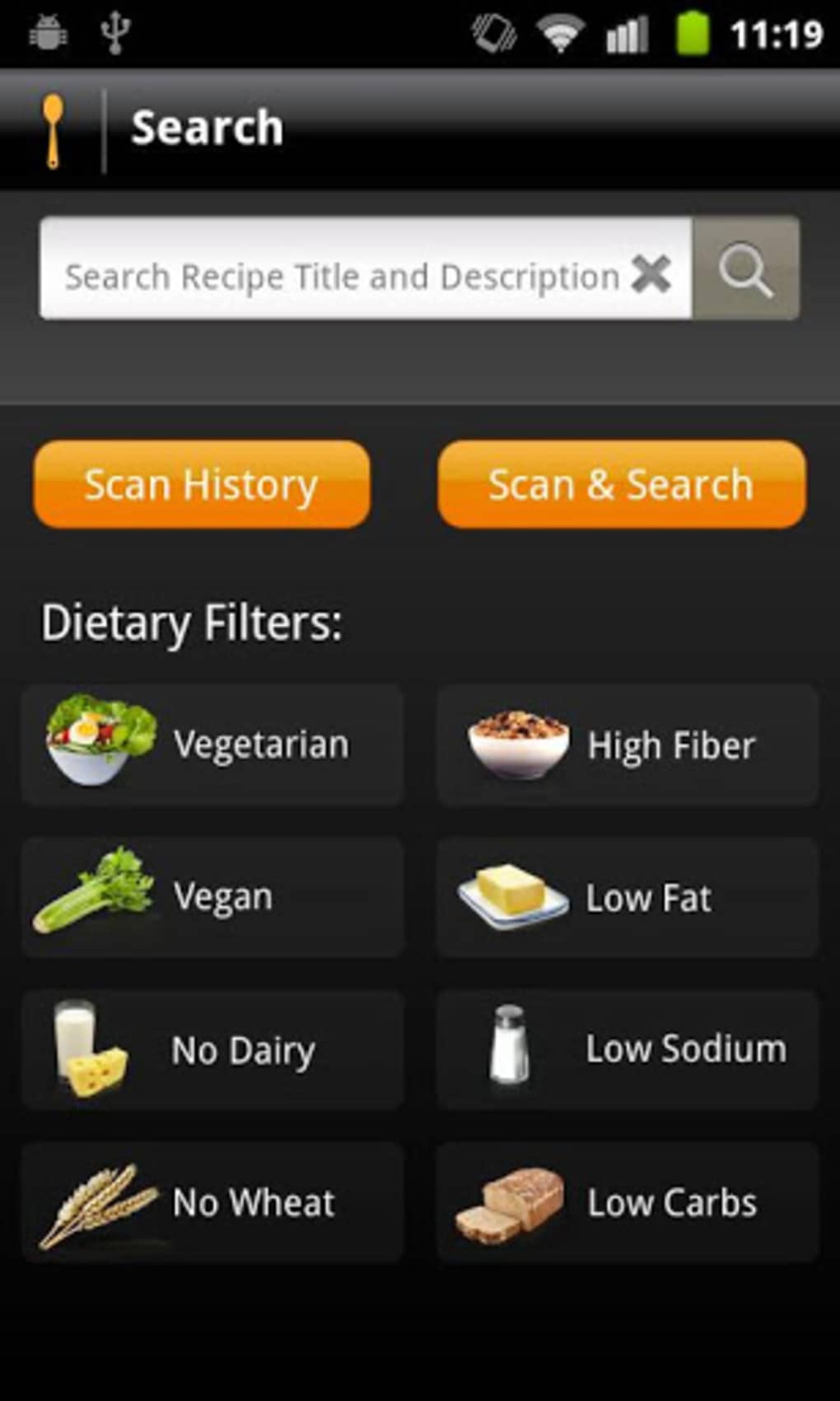
- Recipe Discovery Engine – Access to a large, community-verified recipe database with filtering by dish type, occasion, cuisine, and dietary needs.
- Favorites & Syncing – Save preferred recipes to a personal collection and access them across multiple devices using an Allrecipes account.
- Shopping List Integration – Automatically compile ingredients from selected recipes into a shared shopping list for convenient grocery planning.
- Daily Recommendations – Receive curated suggestions based on trending and highly-rated recipes from the Allrecipes community.
- Meal Planning Tools – Organize weekly meals, track dietary goals, and generate meal schedules with minimal effort.
These capabilities are particularly useful for users who want to reduce decision fatigue when choosing meals. For example, a user can select “dinner” and “under 30 minutes” to find quick, healthy options. Saved recipes can be tagged or grouped by occasion—such as “weeknight dinners” or “weekend brunches”—for faster access.
The shopping list feature consolidates ingredients from multiple recipes, eliminating the need for manual note-taking. The software also supports sharing recipes via email or social media, enhancing collaboration within households or among cooking groups. By integrating community ratings and editorial reviews, the application ensures that recommended recipes are both popular and reliable.
This makes it ideal for beginners seeking guidance and experienced cooks looking to expand their repertoire.
User Interface, Workflow & Performance
The user interface of Allrecipes.com Dinner Spinner is designed with usability in mind, featuring a clean, intuitive layout that prioritizes quick access to key functions. Navigation is structured around a central dashboard that displays daily recommendations, recent favorites, and trending recipes. The main menu allows users to browse by category, search for specific dishes, or view saved items.
Workflow efficiency is enhanced through streamlined steps: selecting a recipe, viewing ingredients, and adding them to a shopping list in just a few clicks. The application maintains a consistent visual style, with clear typography and organized sections that reduce cognitive load. While specific performance metrics such as CPU or RAM usage were not disclosed, the software appears optimized for responsive interaction, with minimal lag during navigation and recipe loading.
Stability during extended use has not been publicly documented, but the application’s design suggests reliable operation under typical usage conditions. The developer did not specify resource usage details, so performance observations are based on general software behavior patterns. Users can expect a smooth experience on modern systems, though exact compatibility with older hardware remains unconfirmed.
Compatibility & System Requirements
Allrecipes.com Dinner Spinner is available for Windows and Mac operating systems, though specific version numbers were not provided. The installation size is listed as 150 MB, indicating a lightweight footprint suitable for most desktop environments. Platform compatibility information is limited, with no mention of support for Linux or other systems.
The developer did not specify exact system requirements, such as minimum processor speed, RAM, or available disk space. As a result, users should consult official sources for updated compatibility details before installation. The software does not appear to require administrative privileges for basic functionality, but certain features—such as account syncing or cloud storage access—may depend on internet connectivity.
The developer did not provide information about hardware acceleration or GPU usage. For users concerned about system impact, it is recommended to verify the software’s behavior on their specific setup. Exact performance details were not specified, and no official benchmarks were released.
Pros and Cons
Pros
- Extensive library of community-rated and editor-approved recipes
- Seamless cross-device synchronization via Allrecipes account
- Integrated shopping list for efficient meal planning
- Intuitive interface with easy navigation and quick access to features
- Supports healthy eating and dietary tracking through recipe filtering
Cons
- Exact system requirements and performance data were not provided
- Limited compatibility details beyond Windows and Mac
- No information on offline functionality or local storage capacity
- Dependent on internet connection for full feature access
- Customization options for meal plans or dietary goals are not described
FAQ Section
Is Allrecipes.com Dinner Spinner available for Windows and Mac?
Yes, the software is compatible with both Windows and Mac operating systems, though specific version numbers were not listed.
Can I use the app offline?
Information about offline functionality was not provided. The application likely requires an internet connection for full access to recipes, syncing, and updates.
Is the software secure?
Allrecipes is a trusted platform with established security practices. However, specific security protocols or data encryption methods used by the desktop application were not disclosed.
How often are updates released?
Regular updates are expected to maintain compatibility and improve features, but the update frequency was not specified by the developer.
What type of license does the software use?
The licensing model was not publicly detailed. The software is likely free to download and use, with optional premium features or subscriptions available through the Allrecipes ecosystem.
Final Thoughts
Allrecipes.com Dinner Spinner stands out as a powerful desktop companion for anyone passionate about cooking, meal planning, and healthy eating. Its integration with the world’s largest recipe community ensures access to reliable, high-quality content that’s constantly refreshed and ranked by real users. The combination of intuitive navigation, smart filtering, and shopping list automation makes meal prep faster and more enjoyable.
While some technical details like system requirements and offline capabilities remain unspecified, the software’s core functionality is robust and well-suited for home cooks and food enthusiasts. It excels in simplifying the cooking journey—from discovery to execution—without overwhelming users with complexity. For those seeking a secure, easy-to-use tool that brings the Allrecipes experience to their desktop, this application delivers strong value.
Download Allrecipes.com Dinner Spinner now and elevate your kitchen experience today.





.png)

